The Tentackle Wizard Maven Plugin
The tentackle-wizard-maven-plugin is a developer productivity tool. While the
tentackle-maven-plugin
and the wurbelizer take care of generating the persistence layer from an existing
model, the wizard plugin helps you
author the source files that carry that model in the first place.
It scaffolds the Java source files for new
PDOs and
operations, filling in the boilerplate
(interfaces, implementations, the model comment block, class IDs, package declarations,
wurblet anchors) so that all you have to do afterward is describe the attributes and write the business
logic. Its goals open an interactive JavaFX wizard, but the pdo, operation, browse, and script
goals can also run unattended in batch mode.
All goals share the prefix tentackle-wizard, so they can be invoked directly from the command line,
e.g. mvn tentackle-wizard:pdo.
Prerequisites
The plugin requires the same JDK and Maven versions as the rest of the framework
(JDK >= 25, Maven >= 3.9.0). Because the wizards are JavaFX applications, the interactive goals
(pdo, operation, browse, script) need a graphical desktop; the browse and script goals
additionally need a reachable Tentackle backend (database or remote server). The init goal and the
batch variants of pdo, operation, browse, and script run headless (the batch variant of
browse still needs a reachable backend).
All goals are aggregator goals and operate on the whole reactor. They are therefore best invoked from the directory of the project's maven parent (the aggregator pom), so that the wizard sees every module and can place the generated files into the correct ones.
Overview of Goals
| Goal | Mode | Purpose |
|---|---|---|
pdo |
interactive / batch | Create the source files for a new Persistent Domain Object. |
operation |
interactive / batch | Create the source files for a new Operation (behavior without an entity). |
browse |
interactive / batch | Connect to a backend, browse persisted PDOs and generate test code. |
script |
interactive / batch | Connect to a backend and run scripts (Groovy, Ruby, …) against it. |
init |
headless | (Re)install the default code-generation templates into the template directory. |
help |
— | Print plugin usage information (generated by the maven-plugin-plugin). |
How the Wizard Places Files: the Model and Profiles
To know where a generated file belongs, the plugin needs two kinds of information.
The model. All goals load the application's
model so the wizard knows which
entities, class IDs, and table names already exist (and can prevent collisions). By default, the model
is read from the dependencies on the plugin classpath (loadModelFromDependencies = true) and from
${project.build.directory}/wurbel/model. The relevant parameters, shared by all goals through the
common base, are:
modelName(tentackle.modelName): the model to load. Defaults to the standard model name.modelDir(tentackle.modelDir): directory holding the model files. Defaults to${project.build.directory}/wurbel/model. Ignored iffilesetsis given.filesets: explicit file sets holding the model, overridingmodelDir.modelDefaults(tentackle.modelDefaults) andentityAliases(tentackle.entityAliases): model defaults and entity aliases to apply while loading, in the same syntax as in the model source.loadModelFromDependencies: also load the model from the resources of the plugin's dependencies (defaulttrue).
Profiles. A profile tells the wizard the target packages and naming for a class of objects.
Almost every Tentackle application groups its entities (e.g., master data vs. transactional data), and
each group typically lives in its own set of packages and its own range of class IDs. You declare one
<profile> per group in the <profiles> configuration; the wizard offers them for selection (or, in
batch mode, picks one per entity by stereotype). Profile names must be unique.
All profiles (for both pdo and operation) share these elements:
name(required): the unique profile name.domainPackage,persistencePackage,domainImplPackage,persistenceImplPackage(required): the target packages for the domain/persistence interfaces and their implementations. Each package must be mapped to exactly one module of the reactor, otherwise the goal fails. This is how the wizard decides which module a file goes into (and a requirement for JPMS since split packages are not allowed in modular projects). The mapping is derived from the directories found in the compile source roots, so every package named in a profile must already exist as a directory — an empty one is enough. A package that does not exist anywhere belongs to no module and the goal aborts withcannot determine module for package …; the same empty package in two modules aborts withempty split package detected. This bites on the first operation of a freshly generated project, see The First Operation.domainInterface,persistenceInterface,domainImplementation,persistenceImplementation(optional): override the default super types (DomainObject,PersistentObject,AbstractDomainObject,AbstractPersistentObject) for the generated types.
PdoProfile adds:
pdoPackage(required): the package of the PDO interface.pdoInterface(optional): the super PDO interface, defaults toPersistentDomainObject.minClassId(required) /maxClassId(optional): the range of class IDs reserved for this profile. IDs below 100 are reserved for Tentackle and rejected. See Class IDs below.tablePrefix(optional): a prefix prepended to table names entered in the wizard, typically a schema such asmd.. This ends up in the model and is not the same as@TableName.prefix(see Table Names).
OperationProfile adds:
operationPackage(required): the package of the operation interface.operationInterface(optional): the super operation interface, defaults toOperation.
The pdo Goal
This is the main goal. It creates the set of source files for a new PDO:
- the PDO interface (carrying the model comment block),
- the domain interface and the persistence interface,
- the domain implementation and the persistence implementation.
Each file is written into the directory of the module that owns its package, as derived from the selected profile.
The goal does not write the remote delegate. Enabling remoting only tailors the generated
files: the persistence implementation gets the import of the delegate interface (the matching
getRemoteDelegate() accessor is woven in later by the MethodsImpl wurblet). The delegate pair itself —
<persistenceImplPackage>.trip.<Name>RemoteDelegate and …RemoteDelegateImpl, see
Naming Rules — is created when needed by the
persistence wurblets:
AssertRemote and every other remote-capable wurblet construct RemoteIncludes, which generates the
two files from the RemoteInterface.ftl and RemoteImplementation.ftl templates if they do not exist
yet. Those templates are installed by the wizard (see Templates below), but never used by its goals.
For a PDO this is automatic: the generated persistence implementation carries the MethodsImpl
wurblet anchor, so the delegates appear on the next build.
Interactive mode (the default) opens the PDO Wizard, a JavaFX dialog. You pick a profile, enter the entity name, choose the inheritance type and the super entity (if any), the table name, whether caching and remoting are enabled, and a description. The wizard validates the input live against the model — it refuses entity names, class IDs, and table names that already exist, and enforces the rules that follow from the chosen inheritance type (for example, an embedded entity gets no class ID and no caching). The next free class ID is pre-filled from the profile's range.
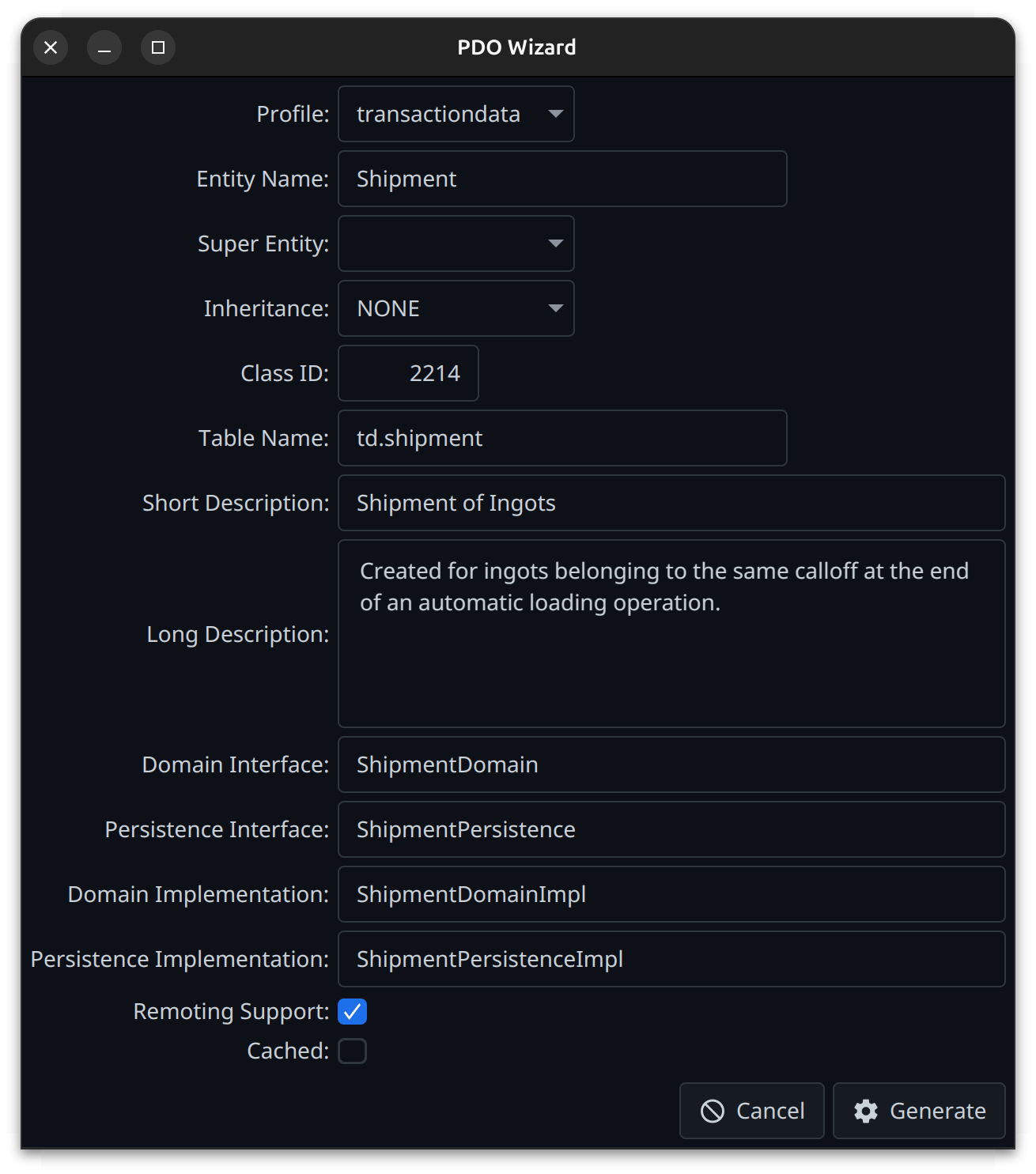
Batch mode is enabled by configuring batchFilesets. Instead of opening the UI, the goal reads a
secondary model from those file sets and generates the code for every entity it contains that does not
yet exist in the project model. This is handy for bootstrapping a project from an existing schema
(e.g., a model dumped by the tentackle-sql-maven-plugin). Batch parameters:
batchFilesets: the file sets holding the secondary model, in plain model format (as used in the wurbelizer here-docs, or as dumped withdumpAsCommentanddumpVariablesbothfalse). Directories default to the project base directory.- If more than one
PdoProfileis configured, each entity must select its profile via a stereotype matching the profile name (case-insensitive), e.g.#MASTERDATA. batchModelDefaults: model defaults applied to the batch model. Defaults to!ROOT, !ROOTID, !ROOTCLASSID, UNTRACKEDto suppress unwanted entity options, since the dumped model usually already has the project defaults baked in.dumpColumnGap(default2): minimum number of spaces between columns in the generated attribute section of the model source.dumpAnnotationsAsOptions: which annotations to render as attribute options in the generated model source (e.g.@NotNull|, @NotZero;@*matches all, a trailing|matches only parameterless annotations).
At least one PdoProfile must be configured or the goal fails.
The operation Goal
The counterpart to pdo for operations —
domain behavior that is not bound to a persistent entity. It generates the operation interface, the
domain and persistence interfaces and their implementations. Configuration mirrors pdo but uses
OperationProfiles; at least one must be configured. There is no class-ID handling (operations have
no class IDs).
As for the pdo goal, the remote delegate is not generated here; remoting only adds the delegate
import and the getRemoteDelegate() override to the persistence implementation. Unlike a PDO, a
generated operation implementation contains no wurblet anchor at all, so the delegate pair is created
on the first build in which the implementation carries a remote-capable wurblet — either an explicit
// @wurblet <tag> AssertRemote or the RemoteMethod blocks the operation needs anyway.
The profile packages must exist before the first run. In a project generated by the
archetype the
operation profile is preconfigured, but its packages do not exist yet — there is no operation to
put in them — so the first invocation fails with cannot determine module for package …. Nor can
they be declared in module-info.java up front: javac rejects an exports for a package holding no
compilation unit. Create the directories, run the goal, then add the exports; the one-time sequence
is spelled out in
The First Operation.
Interactive mode (the default) opens the Operation Wizard. You pick a profile, enter the operation name and a description, optionally a super operation, and decide whether the operation is abstract and whether remoting is supported. The names of the four generated types are derived from the operation name as you type; clearing one of them suppresses the corresponding file.
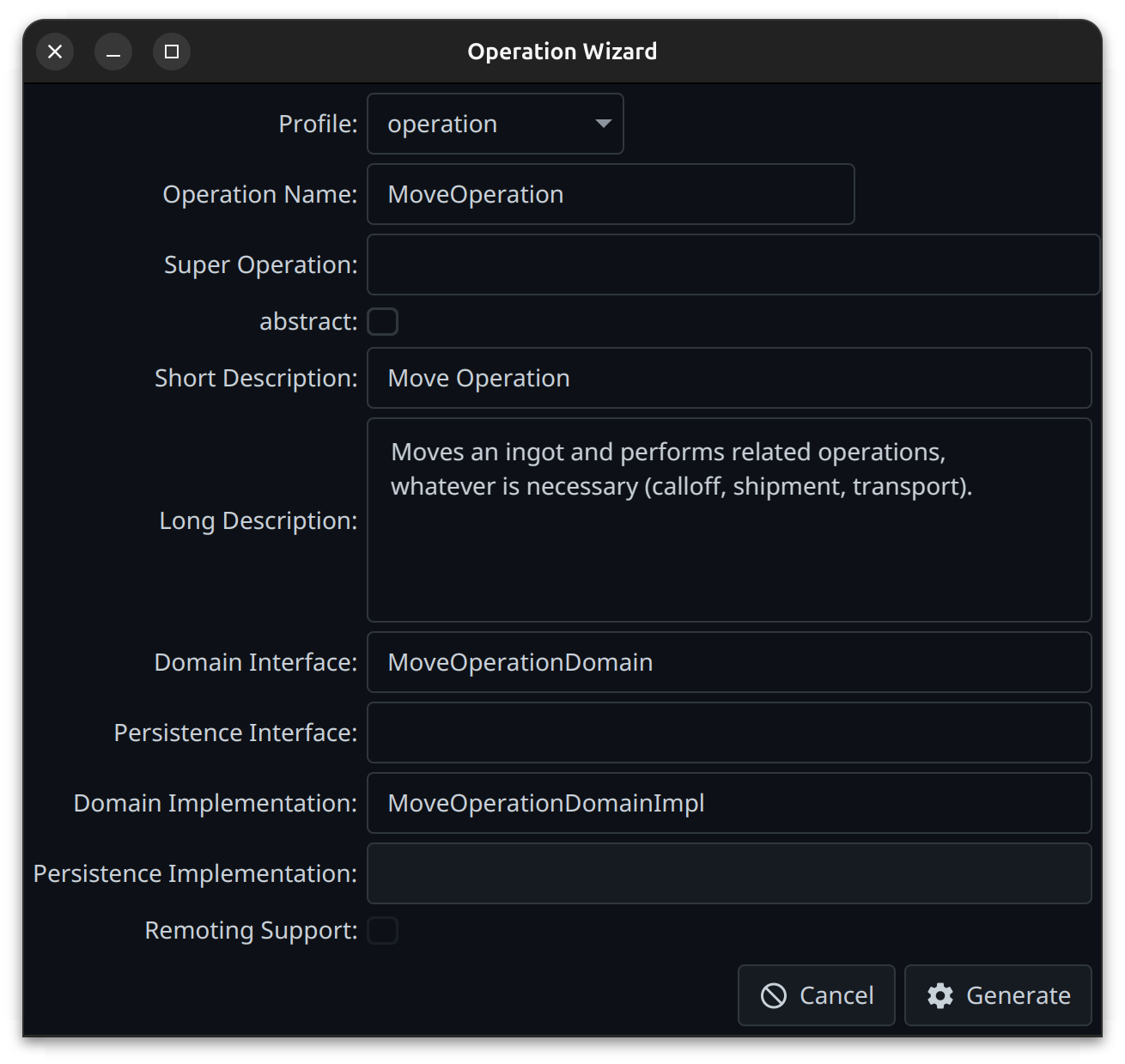
Batch mode is entered as soon as operationName is set. Since operations are not part of the
model, there is no input file to read from: every value the dialog would ask for is given as a
parameter, and one invocation generates exactly one operation.
mvn tentackle-wizard:operation \
    -DoperationName=SendInvoice \
    -Dcomment="sends an invoice to the customer" \
    -Dremote=true
Parameter (-D…) |
Meaning |
|---|---|
operationName |
The operation interface name. Setting it enables batch mode. |
profile |
The OperationProfile to use, matched case-insensitively. Optional if only one is configured. |
comment |
The short description. Mandatory — the generator rejects an operation without one. |
longComment |
The long description. |
remote |
Whether remoting is supported. Only tailors the generated persistence implementation (delegate import and getRemoteDelegate()); it does not generate the delegate. Defaults to the remote option of the project's model defaults. |
superOperation |
The super operation, determining all five super types. Defaults to the profile / framework types. |
abstract |
Generate an abstract operation (default false). |
domainInterface |
Override the derived name. An empty value or - generates no domain interface and no domain implementation. |
persistenceInterface |
Likewise for the persistence side. Suppressing it also disables remoting. |
domainImplementation |
Override the derived name; an empty value or - generates the interface without an implementation. |
persistenceImplementation |
Likewise for the persistence implementation. |
overwrite |
Allow regenerating over existing files (default false). |
At least one of the domain and persistence sides must remain, otherwise the goal fails.
Two differences to the pdo goal are worth knowing:
- The goal fails, it does not warn. An invalid or incomplete operation aborts the build with the validation messages, and an unknown profile name aborts it with the list of configured profiles.
- Existing files are not overwritten. Because an operation is not part of the model, nothing else
can detect that it already exists; the goal therefore checks the target files up front and fails
unless
-Doverwrite=trueis given. This protects business logic added to a previously generated operation.
The browse Goal
Connects to a running backend and generates test code (Java fixtures) from persisted PDOs. It is the tool of choice for building realistic integration-test data from existing records — see tentackle-test-pdo for the step-by-step recipe that feeds the generated code into the test base classes.
Common parameters (valid in both modes):
url(required): the backend URL.user(required) /password: the backend credentials.maxLinesInStringLiteral: caps the number of lines emitted in generated multi-line string literals.mapSchemas(tentackle.mapSchemas): map schema names to flat table names in the generated SQLSELECTstatements. Set it to the same value as everywhere else in the project — see Table Names.
If no backend can be reached, the goal fails with a clear message.
Interactive Mode: the PDO Browser
Interactive mode is the default — it opens the PDO Browser, which lets you navigate the PDOs persisted in the database along their relations, compare them over time, and generate test code (Java fixtures and the corresponding SQL) from the objects you select. It connects with the credentials given above and runs against the live backend, so pointing it at a development or staging database rather than production is a good idea. Note that the browser only reads — it never writes to the database.
The browser shows the Java view of your data, not the SQL view. This is the whole point: it does
not display database columns but the properties of the PDO, read through their getters, in the very
form the application sees them. An enum shows up as its constant, not as the number or character
stored in the column; a Money, a Timestamp, or any application-specific data type shows up as its
formatted Java value, not as its raw column representation; a component or a collection is a subtree,
not a foreign key. Node names are Java property names, and the Type column shows the Java type.
Outgoing relations are followed for you: the referenced object is rendered by its unique domain key,
and its full data is one click away in the details table at the bottom. In other words, you are
browsing objects, not rows — the database columns only surface where you explicitly ask for them, via
copy table name, copy SQL SELECT… and copy SQL SELECTs of referencing PDOs… in the context menus.
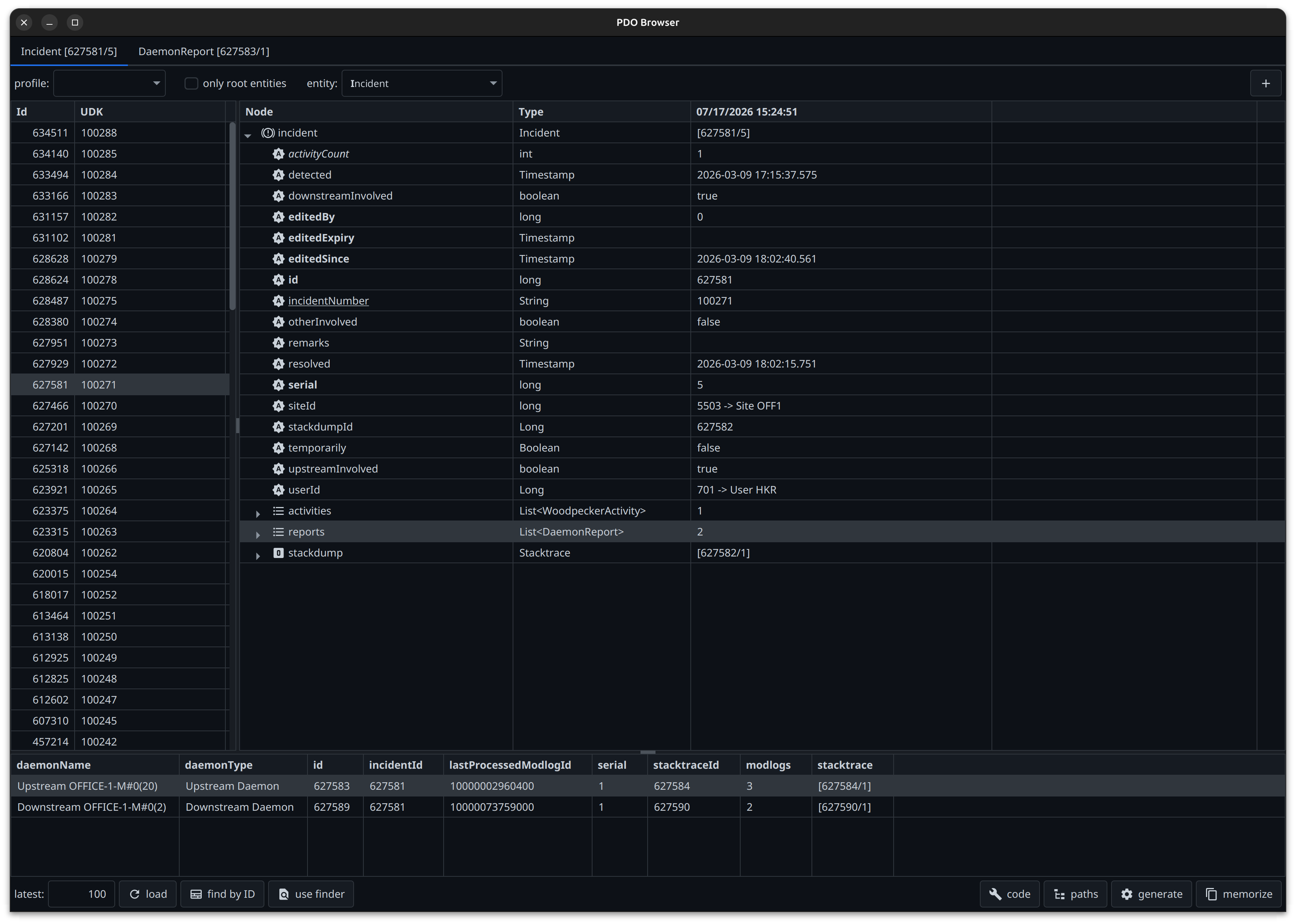
The window is organized into two toolbars and three data areas, the latter resizable via split panes:
| Area | Contents |
|---|---|
| top toolbar | profile, only root entities, entity, and the duplicate (+) button. |
| left table | the loaded PDOs, with their object ID and their unique domain key (UDK). Multi-selectable. |
| right tree table | the object tree of the PDO selected on the left, optionally diffed against a memorized state. |
| bottom table | the row details of the tree node selected above. |
| bottom toolbar | loading on the left (latest, load, find by ID, use finder), code generation on the right (code, paths, generate, memorize). |
Choosing the Entity
The entity combo box lists every persistable entity of the application. Two filters narrow it down: the profile choice box restricts the list to the entities of one profile (i.e. one PDO package), and only root entities hides the components of aggregates. Embedded entities are never listed.
The list is sorted by camel-case letters and renders them in bold, and typing selects by camel-case
prefix — entering CO jumps to CustomerOrder. Selecting an entity immediately loads its records.
Loading PDOs
- latest / load — loads the n most recently created PDOs of the entity (default 100). Changing the count reloads immediately; load re-runs the query.
- find by ID — opens a popup to enter one or more object IDs, separated by whitespace, commas,
colons, semicolons, or slashes. The objects found are inserted at the top of the table and added to
what is already loaded; entering
0as the first ID clears the table first. IDs that do not exist are skipped, non-numeric input is rejected with a warning, and a short note reports how many PDOs were loaded. - use finder — opens the application's own search dialog for that entity and lists its result. The
button is only enabled if the application provides a
GuiProviderwith a finder for the entity, which requires the application's RDC layer on the plugin classpath.
The context menu of the table adds reload, which re-reads the selected PDOs from the database —
the fastest way to see what an application function has just changed (see memorize below). Below it
sit the standard Tentackle table features: auto adjust column widths, print, export to
spreadsheet (all or selected rows; CSV, or XLS if tentackle-fx-rdc-poi is on the plugin classpath),
export to XML, saving and loading the table preferences, and a row counter.
Inspecting the Object Tree
Selecting a PDO on the left expands it into the tree table on the right: its attributes, its embedded
and composite components, and its collections, recursively. Every node is read through the PDO's
getters, so the Type column shows the Java type (Timestamp, List<DaemonReport>, an enum, a custom
data type, …) and the value column its formatted Java value — never the underlying column type or its
encoded representation. For an object node the value is [<id>/<serial>].
Outgoing (non-composite) 1:1 relations are resolved for display: an ID-carrying attribute shows
5503 -> Site OFF1, i.e. the referenced object's unique domain key next to the raw ID, and selecting
it brings up that object's data in the details table below. N:M links are likewise shown as the object
they point to rather than as the link entity. A relation is only resolved this way if the referenced
entity provides a unique domain key; otherwise the attribute stays a plain ID.
The rendering carries meaning:
| Rendering | Meaning |
|---|---|
| bold | an implicit attribute — supplied by the model or the framework, not authored by you (id, serial, editedBy, …). |
| underlined | part of the entity's unique domain key. |
| italic | a hidden component or attribute — no public getter available. |
| highlighted row | the node differs from the memorized state (see below). |
| tooltip | the comment of the attribute or relation, taken from the model. |
The context menu offers, depending on the selected node:
- show differences only / show all lines — only present when a state has been memorized; filters the tree down to the differing nodes and expands them.
- copy FQCN … to clipboard — the fully qualified class name of the selected object.
- copy table name … to clipboard — its database table.
- copy SQL SELECT… to clipboard — a ready-to-run
SELECTthat fetches exactly this node: for an object node the row itself, for an attribute node all rows carrying that value. Inheritance is taken into account (single-table and joined-table hierarchies produce the appropriate column lists and joins), andmapSchemascontrols whether schema names are mapped to flat table names. The item is hidden for embedded objects and for attributes whose data type spans several columns. - copy SQL SELECTs of referencing PDOs to clipboard — the opposite direction: a script answering
who points at this object?, derived from the model. It holds one
SELECTper referencing table and column, each preceded by a comment naming the referencing entity and attribute, grouped into three sections: references (the non-composite relations — the ones that keep the object from being deleted), components (the parts of its aggregate, found via their foreign key), and, for a root entity, aggregate members (every component of the whole aggregate at once, found via itsrootId/rootClassIdcolumns). Relations declared on either side are picked up, references to a super-entity are included, and references living in an embedded type resolve to the prefixed column of the embedding table. The item is only shown for object nodes. - copy class-ID … to clipboard — the class ID of the selected object.
Plus the standard table features described above, extended by expand and collapse for the subtree of the selected node.
The Row Details Table
Selecting a node in the tree fills the table at the bottom, which renders objects as rows and their attributes as columns — the compact, tabular counterpart to the tree:
- an object node yields a single row,
- a list node yields one row per element, which makes comparing the elements of a collection much easier than expanding them one by one in the tree,
- an attribute node carrying an outgoing relation yields the referenced PDO — clicking the
userIdof an incident shows the user's own data, without having to look up the ID in another table. This is the browser's way of navigating relations: one click down the reference, and browse in new tab below if you want to keep it.
Its context menu repeats copy FQCN, copy table name, copy class-ID, copy SQL SELECT… and copy SQL SELECTs of referencing PDOs…, and adds two items of its own:
- copy Java code to clipboard — generates the fixture code for that single object. There is no path configuration here, but it is the quickest way to create the referenced master data an object depends on.
- browse in new tab — opens the object in a new browser tab, which is how you follow a relation without losing the current view.
Comparing States: memorize
The memorize toggle button remembers the currently selected PDO — the whole object tree, timestamped. The tree table then shows two value columns, headed by the load time and the memorize time, and rows that differ are highlighted; show differences only reduces the tree to just those rows.
The typical workflow is: select the PDO, press memorize, run the function under test in the application, then reload the PDO from the table's context menu and look at what changed. Memorization survives a reload, but is dropped when a different entity is selected.
Differences are determined by value as well as by object ID and serial, so an object replaced by
another one is detected too. Implicit attributes and the IDs of composite relations are ignored, since
they carry no domain information. Collections are matched up by ID, so inserted and deleted elements
show up as gaps on one side rather than shifting everything below them.
Working with Several Views
The + button in the top toolbar duplicates the current view — same entity, same selected PDO — into a new tab, as does browse in new tab in the row details menu. The first duplicate turns the window into a tab pane; each tab is titled after its selected object (or its entity, when nothing is selected), so several objects can be inspected side by side. Tabs are closable except for the first one, and closing them until one is left restores the plain single view.
Generating the Code
Select one or more PDOs in the left table and press generate: the browser builds the Java code that
recreates them — on(…), the attribute setters, the components and collections, and a final save() —
and copies it to the clipboard, prefixed with a comment recording the generation time, the user, the
host, and the session it came from. A note confirms what was copied.
Two buttons configure the result:
- code — the code settings popup, holding the same two options as the batch parameters
-Ddistinctand-Doffset: whether each generated instance gets its own numbered variable name, and which number to start at. With distinct variables, the generated code ends inpersist()rather thansave(), so each object stays available under its own name. - paths — a list of check boxes for the code paths of the current selection, i.e. the dotted paths
of the attributes and relations that may be included or excluded. The list is derived from the model
and only offers what is actually configurable: attributes and relations carrying the
NOTESTstereotype (unchecked by default), multi-line string attributes, and N:M relation lists (both checked by default). The button stays disabled when the selection has nothing to configure.
The -DmaxLines parameter (maxLinesInStringLiteral maven property) additionally caps how much
of a long text ends up in the generated string literals.
Preferences
save user preferences in the context menu of either table stores its column layout (order, widths,
visibility, sorting) under the PdoBrowser node of java.util.prefs, separately from the
application's own preferences. Both tables load their preferences on startup, and the initial divider
positions of the split panes follow the stored table widths — so arranging the browser once makes it
come up that way from then on.
Batch Mode
Batch mode runs headless and writes the Java fixture code for a known set of objects straight to a
file, without opening the UI. It is enabled by supplying both the pdo and the output parameters.
This is handy for regenerating fixtures in a scripted or CI setting once you know which records you
want. The objects are selected by entity name and object ID; if any ID cannot be found in the
database, the goal fails.
Batch parameters (supplying both pdo and output switches the goal into batch mode):
pdo(-Dpdo): the objects to generate code for, in the form<entity>[<id>[,<id>,...]], whereentityis the entity name and eachidis an object ID. Example:-Dpdo=Customer[17878,221221,333].output(-Doutput): the file the generated Java code is written to (parent directories are created as needed).distinct(-Ddistinct): by default the variable names of the created entities are reused for the 2nd, 3rd, … instance. Whentrue, the variable names are numbered instead.offset(-Doffset): whendistinctistrue, the number the variable names start at. If unset, the first instance is left unnumbered.
The script Goal
Runs Tentackle scripts against a live
backend, either interactively (edit and run in a JavaFX window) or unattended in batch mode. It is the
tool of choice for ad-hoc data fixes, one-off migrations, or exploring persisted data with the full
domain model at hand — the script runs with the application's dependencies on the classpath, so it can
use on() and op() exactly like application code.
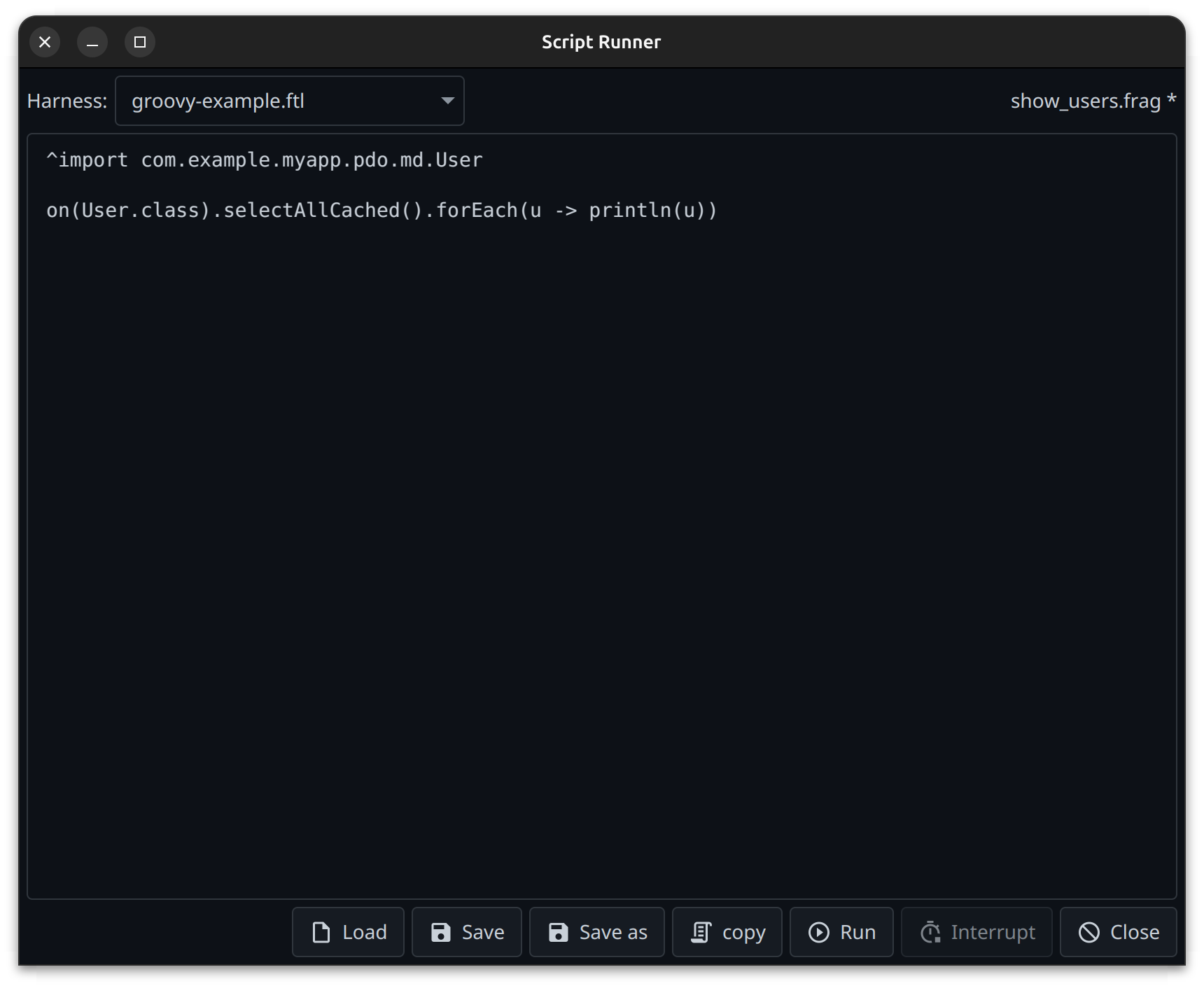
The key concept is the harness. The code you write is only a fragment; it is woven into a
harness, a FreeMarker template that owns the boilerplate: it implements a
DomainContextProvider (so on()/op() resolve), and defines the run() method your fragment is
inserted into. Harnesses are supplied by the developer. The first
line of a harness is a she-bang selecting the scripting language (#!groovy, #!gv, #!ruby, …);
it is stripped and does not land in the generated script. The scripting language provider (e.g.
tentackle-script-groovy) must be on the plugin classpath, added as a <dependency> of the plugin.
Since the fragment lands inside the run() method, it cannot contain import statements itself.
Instead, the fragment marks import lines with a leading ^-sign:
Every line starting with an ^-sign is removed from the fragment, stripped of
the ^-sign, and handed to the harness via the imports variable, which places it at the top level
of the generated script. The mechanism is language-agnostic — in a Ruby fragment, ^require 'json'
becomes a top-level require 'json'.
When weaving, FreeMarker exposes four variables to the harness template:
content: the script fragment, inserted into the harness'srun()method,imports: the import statements extracted from the fragment, one per line,language: the scripting language name,harness: the harness filename.
An example Groovy harness (groovy-example.ftl) is installed alongside the pdo/operation templates (see
Templates below) and can be used as a starting point.
Parameters:
url(required): the backend URL.user(required) /password: the backend credentials.harnesses(optional): the filesets holding the harness templates (instead of the default from the template directory). Harness filenames must be unique across all filesets.harness(-Dharness): pre-selects a harness by filename (without a directory). In batch mode it selects which harness to weave into; it may be omitted if exactly one harness is configured. In interactive mode it pre-selects the combo box entry.script(-Dscript): the path to a file holding the fragment. If given, the goal runs headless in batch mode, weaves the fragment into the selected harness, and runs it. If omitted, the interactive editor opens instead.
Interactive mode opens a window with a combo box to choose the harness, a text area to edit the
fragment, and the buttons Load, Save, Save as, copy, Run, Interrupt and Close. Run
executes the edited fragment on a worker thread; Interrupt interrupts that thread. Interruption is
cooperative — a long-running fragment must check Thread.currentThread().isInterrupted() in its loops
to be interruptible. copy puts the generated script — the fragment woven into the selected harness —
on the clipboard.
The fragment can be kept on disk: Load reads it from a file, Save writes it back to the file it
came from (asking for one if there is none), and Save as always asks. Files are read and written as
UTF-8. The name of the current file is shown next to the harness combo box, followed by an asterisk
while there are unsaved changes; closing the editor with unsaved changes asks for confirmation. The
file used last is remembered per user and project and is reloaded the next time the editor comes up,
so a session can be continued where it left off. A saved fragment is exactly what batch mode expects,
which makes for a natural round trip: develop the fragment interactively, save it, then run it
unattended with -Dscript=<file>.
Batch mode (-Dscript=<file>) reads the fragment from disk and runs it once, failing the build
with the script error if compilation or execution fails.
Since the goal runs with the application's dependencies on the classpath, starting it as a debug
session from within the IDE lets you debug any code in the application's code base. Set a breakpoint,
let the script run into it, and inspect or evaluate whatever you need — for example, evaluate a
Permission with the SecurityManager right
in the debugger.
The init Goal
Copies the bundled default templates into the template directory, overwriting any existing files
there. The wizard installs the templates automatically the first time it runs (when the template
directory does not yet exist), so you normally only need init to reset customized templates back to
their defaults.
Templates
All generated source is produced from FreeMarker templates. They
live under the templateDir parameter (default ${project.basedir}/templates), organized into
categories matching the goals: pdo/, operation/, and script/. The pdo/ and operation/
categories hold one *.ftl per generated artifact, e.g. pdo/PdoInterface.ftl,
pdo/DomainImplementation.ftl, operation/OperationInterface.ftl, and so on. The script/ category
holds a single groovy-example.ftl — an example Groovy harness you can copy and adapt for the script
goal.
Two templates are the exception: RemoteInterface.ftl and RemoteImplementation.ftl (in both pdo/
and operation/) correspond to no file any goal writes. The wizard only installs them; they are
rendered later by the
persistence wurblets,
which look them up under templateDir or <projectRoot>/templates/{pdo|operation} when a remote
delegate is missing. Customize them the same way — but keep them, or the wurbelizer run terminates
when it needs to generate a delegate.
Because the templates are plain files in your project, you can customize them — adjust the license
header, add house-style javadoc, change default imports — and every subsequently generated file will
follow your conventions. Run tentackle-wizard:init to restore the originals.
Class IDs
Every root PDO needs a unique, stable class ID used by the persistence layer. The pdo goal manages these automatically:
- Each
PdoProfiledeclares aminClassId(and optionally amaxClassId). WhenmaxClassIdis omitted, the plugin derives the boundaries from the other profiles' ranges, ensuring they do not overlap. - Before each run, the wizard scans the model for the highest class ID already used per profile and pre-selects the next free one.
- To stay consistent across several PDOs generated without an intermediate
mvn clean/wurbel run, the last allocated ID per profile is recorded in a status file under${project.build.directory}/wizard/<profile>.classid. Because this lives undertarget, it is cleaned bymvn clean.
If a profile runs out of free class IDs, the goal warns; reserved IDs below 100 are rejected.
Example Configuration
<plugin>
  <groupId>org.tentackle</groupId>
  <artifactId>tentackle-wizard-maven-plugin</artifactId>
  <version>${project.version}</version>
  <configuration>
    <profiles>
      <profile>
        <!-- a PdoProfile -->
        <name>masterdata</name>
        <pdoPackage>com.example.app.pdo</pdoPackage>
        <domainPackage>com.example.app.domain</domainPackage>
        <persistencePackage>com.example.app.persistence</persistencePackage>
        <domainImplPackage>com.example.app.domain.impl</domainImplPackage>
        <persistenceImplPackage>com.example.app.persistence.impl</persistenceImplPackage>
        <minClassId>1000</minClassId>
        <maxClassId>1999</maxClassId>
        <tablePrefix>md_</tablePrefix>
      </profile>
    </profiles>
  </configuration>
</plugin>
With this in place:
# scaffold a new PDO interactively
mvn tentackle-wizard:pdo

# scaffold a new operation interactively
mvn tentackle-wizard:operation

# scaffold a new operation headless, everything from the command line
mvn tentackle-wizard:operation -DoperationName=SendInvoice -Dcomment="sends an invoice"

# browse a backend and generate test code interactively
mvn tentackle-wizard:browse

# generate fixture code for selected objects headless, straight to a file
mvn tentackle-wizard:browse -Dpdo=Customer[17878,221221,333] -Doutput=target/fixtures/Customers.java

# run scripts against a backend interactively (edit + run in a window)
mvn tentackle-wizard:script

# run a single script fragment headless, weaving it into groovy-example.ftl
mvn tentackle-wizard:script -Dscript=src/scripts/fix-orders.groovy

# restore the default templates
mvn tentackle-wizard:init
Run these from the aggregator (parent) directory so the wizard can place files into all modules.
The Skills
The goals that run headless are the ones a coding agent can drive, and src/skills/ in this
module holds one ready-made agent skill per goal, describing when and how to use it and what goes wrong
in batch mode:
| Skill | Goal |
|---|---|
tentackle-pdo-wizard |
tentackle-wizard:pdo |
tentackle-operation-wizard |
tentackle-wizard:operation |
tentackle-pdo-browser |
tentackle-wizard:browse |
tentackle-script-runner |
tentackle-wizard:script |
They are templates: copy the ones you want into your own project, alongside the tentackle-model skill
of the MCP plugin.
Agents that do not support skills can be pointed at the same files as plain instructions — in
AGENTS.md, in CLAUDE.md, or in whatever the tool calls its project context. See
AI Agent Tooling Support for how the goals fit together into
one workflow.
How It Fits Into the Workflow
The wizard is a one-shot authoring tool, not part of the regular build lifecycle:
tentackle-wizard:pdo/:operation— scaffold the source files for a new domain object.- You fill in the attributes in the model comment block and add the business logic.
- The normal build (
tentackle:analyze→ wurbelizer → compiler) then generates the persistence mappings and SQL from that model, exactly as described in the Tentackle Maven Plugin documentation.
Further Reading
- AI Agent Tooling Support — driving the
pdo,operation,browseandscriptgoals headless from a coding agent, together with the model MCP server - PDO — Persistent Domain Objects
- Operation — Behavior Without an Entity
- Tentackle Model Definition Syntax
- The Tentackle Maven Plugin
- Validation
- Plugin reference (generated) ```