AI Agent Tooling Support
Tentackle ships tooling that lets a coding agent work on a Tentackle application the way a developer does: inspect the entity model as the code generators see it, scaffold new PDOs, turn persisted records into Java code, run real application code against a live backend, and go down to plain SQL when that is what the question needs.
This document is the map. It explains which tool answers which question, how the pieces fit into one workflow, and what an agent must know before using them. The details of each tool live in its own document, linked from every section.
Why Separate Tooling at All
An agent dropped into a Tentackle project hits three walls that grepping does not get past.
The model is not where it looks. The application's data model is written in a DSL inside a
@> … @< comment block in the PDO interface — with $classname, $classid and $mapping still
unexpanded. The usable form, the .map files under target/wurbel/model, only exists after a build.
Most of the model is derived. Referencing relations, composite paths, the root entity of a
component, the inferred root/rootId/rootClassId options, resolved data types and backend-specific
column names exist only after the whole model has been loaded and its relations resolved. No file
contains them.
The interactive tools are GUIs. The PDO wizard, the operation wizard, the PDO browser and the script editor are JavaFX applications. An agent cannot click through them.
The answer to the first two is the MCP server; the answer to
the third is that the pdo, operation, browse and script goals of the
wizard plugin
all have a batch mode that runs headless and is driven entirely from the command line.
The Seven Capabilities at a Glance
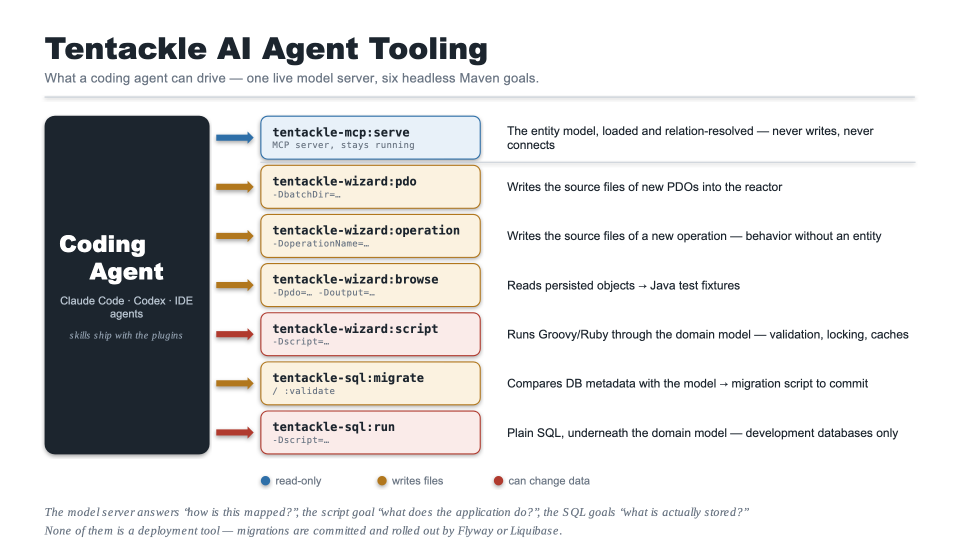
| Task | Tool | Mode | Touches the database |
|---|---|---|---|
| Understand and validate the entity model | tentackle-mcp:serve |
long-running MCP server | no |
| Create the source files for new entities | tentackle-wizard:pdo -DbatchDir=… |
headless, one-shot | no |
| Create the source files for a new operation | tentackle-wizard:operation -DoperationName=… |
headless, one-shot | no |
| Turn persisted records into Java fixture code | tentackle-wizard:browse -Dpdo=… -Doutput=… |
headless, one-shot | reads |
| Run application code against a backend | tentackle-wizard:script -Dscript=… |
headless, one-shot | whatever the script does |
| Bring the database in line with the model | tentackle-sql:migrate / :validate |
headless, one-shot | reads metadata |
| Run plain SQL against a development database | tentackle-sql:run -Dscript=… |
headless, one-shot | whatever the SQL does |
The first is read-only and can be left running all day. The second and third write Java sources into the reactor. The fourth reads from a backend and writes one file. The sixth only generates a migration script — applying it is the seventh's job. The fifth and the seventh can change data: one through the domain model, the other underneath it.
They also form a ladder of abstraction, and picking the right rung is most of the skill: the MCP server answers how is this mapped, the script goal what does the application do with it, and the SQL goals what is actually stored.
tentackle-sql:createis not on this list. It emits the DDL of the whole schema from scratch — every table, index, foreign key and schema of the model, in one script. That is a bootstrapping tool for an empty database, wired into a profile that initializes a test database, and it is essentially never the right answer to "the model changed". For an existing database,tentackle-sql:migrategenerates the incremental script instead. An agent should reach forcreateonly when explicitly asked to produce a fresh-schema script.
Prerequisites
- JDK >= 25 and Maven >= 3.9.0, like the rest of the framework.
- The model must have been generated at least once. Everything below reads the
.mapfiles that the Wurbelizer produces:
- All goals are aggregator goals: run them from the reactor root, so the whole model is visible and generated files land in the right modules.
browseandscriptadditionally need a reachable backend (database or remote server), and the SQL goals a connectable database.tentackle-sql:runis the one goal that does not need the model;tentackle-sql:migrateneeds it to be current, so build before comparing.
Projects generated from the
project archetype
come with all three plugins configured — the MCP plugin with the project's tentackle.modelDefaults and
backends, the wizard plugin with the PDO/operation profiles and the backend credentials, the SQL plugin
with the backends it migrates — so the commands below work as written.
Analyzing the Model: the MCP Server
tentackle-mcp-maven-plugin runs an MCP server that holds the
model loaded and relation-resolved, exactly as the code generators see it, and exposes it over
Streamable HTTP. See
The Tentackle MCP Maven Plugin
for the full reference.
It logs the endpoint and blocks:
[INFO] 42 entities loaded from /home/me/myapp/target/wurbel/model
[INFO] MCP endpoint: http://localhost:8770/mcp
[INFO] claude mcp add --transport http tentackle-model http://localhost:8770/mcp
[INFO] stop with Ctrl-C
Register it once with the agent's client — or commit an .mcp.json in the project root so the whole
team gets it:
The server is read-only: it writes no file, opens no database connection and loads no application class. It re-scans the model files before each call, so a rebuild in another terminal is picked up without a restart.
What It Answers
| Tool | Question |
|---|---|
model_overview |
What is loaded: sources, backends, effective model defaults, inheritance hierarchies, aggregate roots, configuration warnings. The entry point. |
model_list_entities |
The entity index, narrowed by name pattern or by filter (composite, abstract, root, embedded, cached, …). |
model_find |
Where does this name occur? Searches entity, table, attribute, column, relation and index names. |
model_describe_entity |
One entity — canonical definition, attributes, relations, indexes, inheritance, aggregate, references, embedding, unique domain key, DDL. |
model_source |
The model definition as text, raw, canonical or compact, optionally as a @> … @< block. |
model_paths |
How two entities are connected; direct neighbors; composite and embedding paths. |
model_ddl |
The CREATE TABLE / CREATE INDEX / foreign key statements for a backend. Text only. |
model_validate |
Is the model consistent — or would this draft definition be? See below. |
model_reload |
Refresh after a build; full after an entity was deleted or renamed. |
Every entity argument accepts the entity name, table:<tableName> or id:<classId>, because all three
turn up in the sources an agent is reading.
The grammar itself is served as a resource, tentackle-model://grammar/model-definition, so an agent
never has to guess the
DSL.
The Validation Loop
model_validate is what turns model authoring from a build-cycle game into a sub-second loop. Passed a
source, it stages the candidate definition into a scratch copy of the model, resolves relations
across the whole set and runs the custom validators — replacing an existing entity if entity is
given, adding a new one otherwise. Nothing is written and the live model is untouched:
model_validate {"source": "name := Note\ntable := note\nid := 9001\n…"}

candidate (new entity) is NOT consistent:

duplicate entity id 9001 for Note, already assigned to Customer
Always configure
modelDefaultsin the plugin configuration. They come from the project's property, not from the model sources; without them the server loads a model that differs from what the build sees and reports integrity errors that do not exist in the build. It says so in every overview and validation result rather than defaulting silently — a warning there is worth acting on.
A ready-made agent skill for the server, tentackle-model, ships with the plugin — see
The Bundled Skills below.
Creating Entities: tentackle-wizard:pdo in Batch Mode
The pdo goal creates the whole set of source files for a new PDO — the PDO interface carrying the
model comment block, the domain and persistence interfaces, their implementations, and the remote
interface and implementation if remoting is enabled — each written into the module that owns its
package.
Interactively that means a JavaFX dialog. Batch mode replaces the dialog with a directory of model definitions: the goal reads a secondary model from those files and generates the code for every entity in it that does not yet exist in the project model.
-DbatchDir is the command-line form and takes a single directory, every file in which is treated as
input. The POM equivalent is batchFilesets, which takes several file sets and the usual
includes/excludes; directories default to the project base directory.
The Input Format
The files are in plain model format — the same text the Wurbelizer reads from its here-docs, and
the same the SQL plugin
writes with dumpAsComment and dumpVariables both false. That is: no @> … @< wrapper and no
$classname-style variables, just the sections themselves:
# a note attached to a customer
name := Note
id := 2101
table := td.note
alias := note
integrity := full

## attributes
[#TRANSACTIONDATA]
String(80)   subject     subject    the note's subject
String       text        text       the note's body
Timestamp    created     created    when the note was written

## indexes
index := created

## relations
Customer:
 relation = object,
 delete = restrict
Two things make this work in an agent's hands:
- The class id must be free. Confirm it with
model_list_entitiesfirst — a duplicate class id is the single most common mistake, and the wizard's live validation is exactly what batch mode does not give you. - Validate before generating. Run each candidate through
model_validateon the MCP server. The parse and consistency errors it reports in under a second are the ones that would otherwise surface as aWurbelTerminationExceptionafter a full reactor build.
Profile Selection
A profile
tells the wizard the target packages, the super types and the class-id range for a class of entities —
typically one per group, such as master data and transaction data. If more than one PdoProfile is
configured, each entity must name its profile as a stereotype in the global options line,
case-insensitively: [#TRANSACTIONDATA] selects the profile named transactiondata. An entity that
matches no profile is skipped with an error; an entity that already exists in the project model is
skipped with a warning.
At least one PdoProfile must be configured, or the goal fails.
Batch-Specific Parameters
| Parameter | Property | Purpose |
|---|---|---|
batchDir |
batchDir |
The single input directory. Command-line form of batchFilesets. |
batchFilesets |
— | Input file sets, configured in the POM. |
batchModelDefaults |
batchDefaults |
Model defaults applied to the batch model. Defaults to !ROOT, !ROOTID, !ROOTCLASSID, !BIND, UNTRACKED — a dumped model usually has the project defaults baked in already, so they must not be applied twice. |
dumpColumnGap |
— | Minimum spaces between columns in the generated attribute section. Defaults to 2. |
dumpAnnotationsAsOptions |
— | Which annotations to render as attribute options, e.g. @NotNull|, @NotZero. |
Class ids are still managed: the goal scans the model for the highest id used per profile, records the
last allocated one under ${project.build.directory}/wizard/<profile>.classid, and warns when a
profile runs out.
Afterwards
The generated files are scaffolding. The model block is filled in, but the business logic is not — that
is the part a human or an agent writes next. Then run the build, which drives
tentackle:analyze → Wurbelizer → compiler and produces the persistence mappings and the SQL. Once
the build is through, call model_reload so the MCP server sees the new entities.
Creating Operations: tentackle-wizard:operation in Batch Mode
An operation is behavior that is not bound to a
persistent entity, and the operation goal scaffolds its five source files: the operation interface,
the domain and persistence interfaces, and their two implementations.
Operations are not part of the model — they carry no class id and appear in no .map file. There
is therefore nothing to read a batch definition from, and everything the dialog would ask for is given
on the command line instead. One invocation creates one operation:
mvn tentackle-wizard:operation \
    -DoperationName=SendInvoice \
    -Dcomment="sends an invoice to the customer"
| Property | Purpose |
|---|---|
operationName |
The operation interface name. Setting it enables batch mode. |
profile |
The OperationProfile, case-insensitive. Can be omitted if only one is configured. |
comment |
The short description. Mandatory. |
longComment |
The long description. |
remote |
Whether remoting is supported. Defaults to the project's model defaults. |
superOperation |
The super operation, determining all five super types. |
abstract |
Generate an abstract operation. |
domainInterface, persistenceInterface, domainImplementation, persistenceImplementation |
Override the names derived from the operation name. An empty value or - suppresses that file; suppressing an interface suppresses its implementation too. |
overwrite |
Regenerate over existing files (default false). |
Unlike the pdo goal, this one fails instead of warning: an incomplete operation aborts the build
with the validation messages, an unknown profile with the list of configured profiles, and existing
target files abort it unless -Doverwrite=true is given. Since nothing else can detect that an
operation already exists, that last guard is what keeps a re-run from destroying business logic
written into a previously generated operation.
Afterwards, the same rule as for entities applies: the files are scaffolding, the business logic is
what an agent writes next. If the operation went into a package that is new to its module, add the
exports to that module's module-info.java — no wizard goal touches it.
Java Code From the Database: tentackle-wizard:browse in Batch Mode
The browse goal generates Java fixture code from persisted PDOs — the on(…) call, the attribute
setters, the components and collections, and the final save() that recreates the object. It is the
fastest way to build realistic integration-test data out of records that already exist; see
tentackle-test-pdo
for how the generated code feeds into the test base classes.
Interactively it is the PDO Browser, a JavaFX window. Batch mode needs both -Dpdo and -Doutput,
and then runs headless:
mvn tentackle-wizard:browse \
    -Dpdo=Customer[17878,221221,333] \
    -Doutput=target/fixtures/Customers.java
-Dpdo=<entity>[<id>,<id>,…]— the entity name and the object ids to generate for. If any id is not found in the database, the goal fails.-Doutput=<file>— the file to write; parent directories are created.-Ddistinct— number the variable names instead of reusing them for the 2nd, 3rd, … instance. With distinct variables the generated code ends inpersist()rather thansave(), so every object stays reachable under its own name.-Doffset=<n>— the number the variable names start at whendistinctis set.-DmaxLines=<n>— cap the number of lines emitted in multi-line string literals.
The output is prefixed with a comment recording the generation time, the user, the host and the session, so a fixture always says where it came from.
The backend url, user and password are plugin parameters and normally already configured in the
POM. The goal only reads — it never writes to the database — but it does connect to a live
backend, so point it at development or staging rather than production.
Batch mode has no path configuration: the code paths that the interactive browser offers as check boxes
(attributes carrying the NOTEST stereotype, multi-line strings, N:M relation lists) fall back to their
defaults. When an agent needs to know which objects to name in -Dpdo, the ids usually come from a
SELECT — or from a script run, below.
Running Application Code: tentackle-wizard:script in Batch Mode
The script goal runs a Tentackle script against
a live backend with the application's dependencies on the classpath, so the script can use on() and
op() exactly like application code. It is the tool for ad-hoc queries, one-off data fixes,
migrations, and for checking what the application actually does rather than what the sources suggest.
Supplying -Dscript=<file> switches the goal to batch mode: it reads the fragment from disk, weaves it,
runs it once, and fails the build with the script error if compilation or execution fails. Without it,
the interactive editor opens instead.
Fragments and Harnesses
The code you write is only a fragment. It is woven into a harness: a FreeMarker template that
owns the boilerplate — it implements a DomainContextProvider so on() and op() resolve, and defines
the run() method the fragment is inserted into. The first line of a harness is a she-bang selecting
the scripting language (#!groovy, #!ruby, …); it is stripped and does not land in the generated
script.
Harnesses live in the script/ category of the template directory (${project.basedir}/templates by
default); tentackle-wizard:init installs a groovy-example.ftl to start from. -Dharness=<filename>
selects one; it may be omitted when exactly one is configured.
Because the fragment lands inside run(), it cannot contain import statements. Instead, import lines
are marked with a leading ^, which the weaver strips and hands to the harness through the imports
variable so they end up at the top level of the generated script. The mechanism is language-agnostic —
in a Ruby fragment ^require 'json' becomes a top-level require 'json'.
^import org.tentackle.misc.*
^import java.time.LocalDate

def cutoff = new Timestamp(LocalDate.now().minusDays(30))
on(Order.class).selectAll().each { order ->
  if (order.getCreated().before(cutoff) && order.isOpen()) {
    println "${order.getId()}\t${order.getOrderNumber()}\t${order.getCustomer().getName()}"
  }
}
FreeMarker exposes four variables to the harness: content (the fragment), imports, language and
harness (the harness filename).
What an Agent Should Know
- The scripting-language provider must be on the plugin classpath — add
tentackle-script-groovy(or-script-ruby, or-script-jsr) as a<dependency>of the wizard plugin. The archetype does not add one by default. - This is the one capability that can change data. The script runs with the credentials configured for the plugin and does whatever it says. Treat a write script the way you would treat a migration: read it, know the target backend, and prefer a development database.
- Reading is a legitimate use and often the best one. A script that prints ids, counts rows or walks
an aggregate answers questions the model alone cannot — and its output is exactly what
-Dpdoneeds. - Batch mode is non-interactive: there is no Interrupt button, so guard long loops yourself.
Following the Model: tentackle-sql:migrate
When the model changes, the database has to follow. The SQL plugin reads the database's metadata through JDBC, compares it table by table against the model, and writes the SQL that would bring it in line — added, altered, renamed and dropped columns and indexes, foreign keys, renamed and dropped tables.
mvn tentackle-sql:migrate       # generate target/sql/<backend>/migratemodel.sql
mvn tentackle-sql:validate      # same comparison, but fail the build if anything differs
It generates; it does not apply. Nothing is executed against the database. That separation is the
whole point: the script is meant to be read, then committed as a versioned migration and applied by
the project's migration tool — Flyway, Liquibase or
whatever it uses — which tracks what each database has already had applied. tentackle-sql:run is for
trying the script out on a development database; it is not the rollout path.
validate is the cheap form of the question is this database still in sync with the model? — worth
running after pulling changes, and the goal CI uses to guard deployed databases.
What an Agent Should Know
- A required migration does not fail the build.
migratelogsdatabase meta data differs from object modelas a warning and exits successfully. A green build says nothing about whether the database is in sync;validateis what turns the difference into a failure. - Renamed columns keep their data. The migrator preserves what it can: it pairs added attributes
with disappeared columns — unambiguously by SQL type first, then by syllable distance among the
candidates of the same type — and emits a
RENAMErather than a drop plus an add. Even bulk renames usually come out right in one go (x_position → position_x,y_position → position_y,z_position → position_z). Where it guesses, the alternativeADDandDROPstatements are written into the script as comments, so a wrong guess is visible and correctable. Table renames are the exception — those are not guessed and need a hint. - Migration hints are for what cannot be derived: a renamed or deliberately dropped table, data
that has to be converted (a string column becoming a number — the migrator then emits the
ALTERcommented out instead of a statement that would fail, and the conversion SQL goes into amigrate <table>#<col>hint), a wrong rename guess, and ordering between dependent tables. They are plain text files supplied per backend. - Always read the script before applying it. It is a plain file under
target/sql/<backend>/, and reading it is the only review step there is — in particular theDROPstatements and the commented-out alternatives. - One script per backend. Each configured backend gets its own comparison and its own file; they are not interchangeable.
- Tables not in the model are reported as unexpected. Declare the legitimate ones as
alienTablesrather than dropping them. - The model must be current. The comparison uses the generated model under
target/wurbel/model, so a model edit that has not been through a build simply does not exist yet.
Plain SQL: tentackle-sql:run
The same plugin's run goal is the odd one out: it simply executes an SQL script against the backends
the plugin is already configured for, and logs every statement's result. It is how you try out the
migration the previous section generated — and, just as usefully, how you answer a question about the
data.
Development only.
runknows nothing about which scripts a database has already seen: no versioning, no checksums, no rollback, no record that it ran. It belongs on a developer's database and on a build's test database. Migrations reach staging and production through the committed script and a migration tool, never through this goal.
-Dscript is the only parameter and is required — there is no inline-SQL form, so the statements go
into a file first. Result sets are printed as an aligned table with column headers and updates as their
update count, which makes a SELECT a perfectly good way for an agent to look at the database
without writing a line of Java:
The script is split on the backend's statement separator (;), with -- line comments and /* … */
block comments stripped before anything reaches the database and quoted strings respected. It is a JDBC
script runner, not a database CLI: psql- or sqlplus-style client commands do not work.
Backend configuration is inherited from the migrate goal, which is convenient — and the source of the
one thing to be careful about.
What an Agent Should Know
- It runs against every configured connectable backend, one after the other. A project that configures PostgreSQL and H2 gets the script executed twice, against both. Read the plugin configuration and state which databases will be hit before running anything that writes.
- There is no transaction. The connection is opened with autocommit on and the runner is not
transactional, so each statement commits as it executes. A script failing on statement 7 leaves 1–6
committed and the build red. Add explicit
BEGIN/COMMITif the backend supports it in a script. - It bypasses the domain layer entirely — no validation, no optimistic locking, no
serialbump, no token locks, no modification tracking, no cache invalidation. Running clients will not notice the change. For data fixes against a live system,tentackle-wizard:scriptis almost always the better tool;tentackle-sql:runis for inspection, for bulk work, and for executing the migration scripts the plugin generated. - Names are the mapped ones, schema-qualified as in the model (
td.order) or flattened whenmapSchemasis set for a backend without schemas. Get them frommodel_ddlor theddlsection ofmodel_describe_entityrather than guessing from the entity name. - Structural changes belong in the model, not in a hand-written
ALTER. Change the model, lettentackle-sql:migrategenerate the migration, then run that. Otherwise the nexttentackle-sql:validatefails and the database drifts away from the model.
The Bundled Skills
Each of the seven capabilities ships with a ready-made agent skill — a SKILL.md describing when to
reach for the tool, the order of steps that works, and the failure modes that are specific to running it
headless:
| Skill | Lives in | Covers |
|---|---|---|
tentackle-model |
tentackle-mcp-maven-plugin/src/skills/ |
tentackle-mcp:serve |
tentackle-pdo-wizard |
tentackle-wizard-maven-plugin/src/skills/ |
tentackle-wizard:pdo |
tentackle-operation-wizard |
tentackle-wizard-maven-plugin/src/skills/ |
tentackle-wizard:operation |
tentackle-pdo-browser |
tentackle-wizard-maven-plugin/src/skills/ |
tentackle-wizard:browse |
tentackle-script-runner |
tentackle-wizard-maven-plugin/src/skills/ |
tentackle-wizard:script |
tentackle-sql-migrator |
tentackle-sql-maven-plugin/src/skills/ |
tentackle-sql:migrate / :validate |
tentackle-sql-runner |
tentackle-sql-maven-plugin/src/skills/ |
tentackle-sql:run |
They are templates, not something the build installs. Copy the ones you want into your project and adapt them — the profile names, the target backend and the harnesses are yours, not the framework's:
mkdir -p .claude/skills
cp -r path/to/tentackle-mcp-maven-plugin/src/skills/* .claude/skills/
cp -r path/to/tentackle-wizard-maven-plugin/src/skills/* .claude/skills/
cp -r path/to/tentackle-sql-maven-plugin/src/skills/* .claude/skills/
Agents without skill support can be pointed at the same files as plain instructions — in AGENTS.md, in
CLAUDE.md, or in whatever the tool calls its project context. The skills cross-reference each other in
the order the workflow below uses them.
Putting It Together
A realistic end-to-end run, adding an entity to an existing application:
- Start the server —
mvn tentackle-mcp:servein another terminal, once. Register it with the agent's MCP client. - Orient —
model_overviewfor the project's model defaults and integrity mode, thenmodel_describe_entityon one or two comparable entities to match their conventions instead of inventing new ones. - Check the connections —
model_pathsbefore adding a relation; the link often exists already. - Pick a free class id —
model_list_entities. - Draft and validate — write the definition, run
model_validatewith it assource, fix, repeat until it says the candidate is consistent. Nothing has been written yet. - Generate — drop the validated definition into a batch directory and run
mvn tentackle-wizard:pdo -DbatchDir=…. Add the profile stereotype if the project has more than one profile. - Build —
mvn install, so the wurblets generate the persistence and domain layers and the SQL plugin the DDL. Thenmodel_reloadon the server. - Bring the database along — write the migration hints first if a table was renamed or data has to
be converted, then
mvn tentackle-sql:migrateand readtarget/sql/<backend>/migratemodel.sql. Try it on your own database withmvn tentackle-sql:run -Dscript=…, confirm withmvn tentackle-sql:validatethat nothing is left over, then commit the script as a versioned migration for the migration tool to roll out. - Write the logic, then verify against a real backend with
mvn tentackle-wizard:script -Dscript=…. - Build fixtures — once records exist,
mvn tentackle-wizard:browse -Dpdo=… -Doutput=…turns them into test code. The object ids it needs usually come out of aSELECTrun withmvn tentackle-sql:run -Dscript=…. - Check the database if something looks wrong —
tentackle-sql:runshows what was really stored, which is the fastest way to tell a mapping problem from a domain-logic problem.
Steps 2–5 are the loop that pays for itself: they replace "write a model block, run the reactor, read the stack trace" with a sub-second answer.
Adding an operation instead of an entity skips steps 3–6 entirely: there is no model block to
draft, validate or find a class id for. It collapses to one
mvn tentackle-wizard:operation -DoperationName=… -Dcomment=…, followed by the build and the business
logic.
Boundaries Worth Stating
| Tool | Writes files | Touches the database |
|---|---|---|
tentackle-mcp:serve |
never | never connects |
tentackle-wizard:pdo |
Java sources across the reactor | never connects |
tentackle-wizard:operation |
up to five Java sources | never connects |
tentackle-wizard:browse |
one output file | reads only |
tentackle-wizard:script |
whatever the script writes | whatever the script does |
tentackle-sql:migrate |
one SQL script per backend | reads metadata only |
tentackle-sql:run |
never | whatever the SQL does, on every configured backend |
Four more notes:
- The MCP server has no authentication and binds to
localhostby default. It exposes your data model, not your data — keep it that way unless you know what you are doing. - None of these goals is a deployment tool. They all run against whatever the POM points them at, which is meant to be a development or test database. Bringing a real environment forward is the job of the committed migration script and a migration tool that tracks what each database has applied.
- The two script goals are not interchangeable.
tentackle-wizard:scriptgoes through the domain model — validation, locking, tracking, caches.tentackle-sql:rungoes underneath it. Choosing the second for convenience when the first is meant is how a database ends up inconsistent with the application that owns it. - The
.javasource and the MCP server disagree, and both are right. The block in the PDO interface still contains$classname,$classidand$mapping; the server shows the expanded, resolved form. Write the variables back when editing the interface.
Further Reading
- The Tentackle MCP Maven Plugin — the server's full reference.
- The Tentackle Wizard Maven Plugin — all goals, both modes, profiles and templates.
- Model Definition Syntax — the DSL an agent writes.
- Tentackle Model — the API the server exposes.
- Tentackle Scripting — the pluggable scripting API behind the
scriptgoal. - tentackle-test-pdo — where the generated fixture code goes.
- SQL Maven Plugin — the
rungoal, the migrations it generates, and dumping a model in the format thepdobatch mode reads. - Quickstart — generating, building and running a multi-tier application.